This will be my fourth and final post on Loaders and the LoaderManager. Let me know in the comments if they have been helpful! Links to my previous Loader-related posts are given below:
- Part 1: Life Before Loaders
- Part 2: Understanding the LoaderManager
- Part 3: Implementing Loaders
- Part 4: Tutorial: AppListLoader
Introducing AppListLoader
Due to public demand, I've written a sample application that illustrates how to correctly implement a custom Loader. The application is named AppListLoader, and it is a simple demo application that queries and lists all installed applications on your Android device. The application is a modified, re-thought (and bug-free) extension of the LoaderCustom.java sample that is provided in the API Demos. The application uses an AppListLoader (a subclass of AsyncTaskLoader) to query its data, and the LoaderManager to manage the Loader across the Activity/Fragment lifecycle:
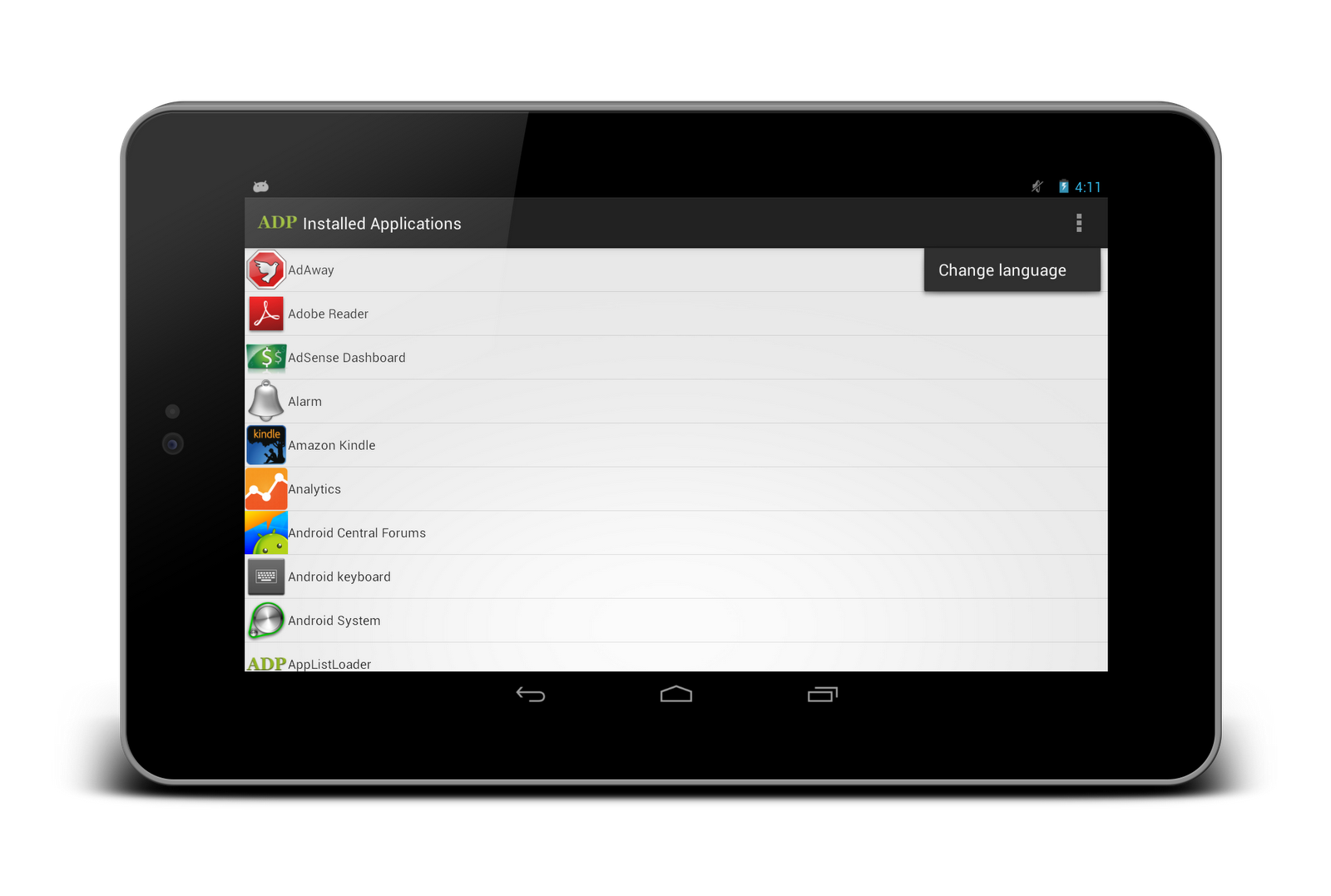
The AppListLoader registers two BroadcastReceivers which observe/listen for system-wide broadcasts that impact the underlying data source. The InstalledAppsObserver listens for newly installed, updated, or removed applications, and the SystemLocaleObserver listens for locale changes. For example, if the user changes the language from English to Spanish, the SystemLocaleObserver will notify the AppListLoader to re-query its data so that the application can display each application's name in Spanish (assuming an alternate Spanish name has been provided). Click "Change language" in the options menu and watch the Loader's seamless reaction to the event (it's awesome, isn't it? :P).
Log messages are written to the logcat whenever an important Loader/LoaderManager-related event occurs, so be sure to run the application while analyzing the logcat! Hopefully it'll give you a better understanding of how Loaders work in conjunction with the LoaderManager and the Activity/Fragment lifecycle. Be sure to filter the logcat by application name ("com.adp.loadercustom") for the best results!
Download the App!
You can download the application from Google Play by clicking the badge below:

Grab the Source Code!
The source code is available on GitHub. An excessive amount of comments flesh out the entire application-Loader workflow. Download it, import it as an eclipse project, and modify it all you want! :)
Leave a comment!
Let me know if these posts have been helpful by leaving a comment below! As always, don't hesitate to ask questions either!


i love this! -hiro
ReplyDeletei love this! -june
ReplyDeleteI love this! -alex
ReplyDeleteGetting trolled so hard right now... lol
ReplyDeletegood job....:)
ReplyDeleteAlex,
ReplyDeleteI am still struggling just a little bit.
Ithink I have now grasped the basic function of a Loader as means of implementing a Cursor for (say) a ListView.
But, what about if the UI allows the User to update SQLite database (say) by OnClick ?
Does one then have to create a new Loader, in order to refresh the ListView or is this part of the magic of Loaders ?
If you need to refresh the Cursor, then you can tell the LoaderManager to refresh the Loader's data by calling LoaderManager#restartLoader(int, Bundle, LoaderCallbacks), where the first int argument is the Loader's unique id. If you are using a ContentProvider, you can use the ContentResolver's notifyChange(Uri) method and the CursorLoaders will receive a notification that its data needs to be refreshed and will force a new load accordingly. Note that notifyChange(Uri) will only notify Cursors registered to receive notification for the specified Uri... this is why ContentProvider#query() implementations will usually call "cursor.setNotificationUri(uri)" before returning the cursor (so that the cursor will receive these notifications in the future). Does that make more sense?
DeleteYes, Thanks Alex, that makes lots of sense. Just to be totally clear, though, am I right in assuming this is the correct thing to do if the UI wants to dynamically update the ListView.
ReplyDeleteFor example, a user may want to 'tick' an item on a list as done and see that result on the UI as well as updating database.
Yup, what I said above should apply to this case as well. :)
DeleteGreat series Alex! I have just this week taken the task up of updating my app to using loaders. My biggest complaint so far after completing most of my updates, is that this method seems way slower than the old method of using startManagingCursor(). In side by side testing on devices my old methods displayed the data almost immediately where using the loader methods there is a significant delay. I am sure it is in my implementation of the loader but can't see where it is just yet. This series definitely helped me understand the full process better, now if I could only get the speed back again.
ReplyDeleteThat is very surprising to me... I have never come across a scenario in which startManagingCursor() has out-performed that of a Loader. I can't think of any reason why it would be slower either... in both cases, the work should be dominated by the work of the query itself. If you follow the basic template I outlined in the second part of this series, your CursorLoader should definitely outperform the other in terms of UI responsiveness since the query is performed asynchronously. Maybe the problem comes from something else, like your usage of Fragment's for example?
DeleteAlex,
ReplyDeleteI am going round in circles and I hope you can help.
I have successfully implemented Loaders and ContentProviders and all works well with a SimpleCursorAdapter and a 1-field ListView.
Now I am trying to create a custom ListView with multiple fields and images, so I need a custom adapter. I am trying to use CursorAdapter as my base (rather than SimpleCursorAdapter) but the problem is that the custom CursorAdapter keeps crashing on initialisation as I don't have a Cursor,as I am initialising it with null Cursor.
How do I get around this problem of creating a custom CursorAdapter without a starting cursor, so that Loader can swap cursor on LoadFinished ?
Have you taken a look at the source code? Check out line 170 and 172... the CursorAdapter constructor will check to see if the Cursor is null before initializing it, so there shouldn't be any problem in that regard. Maybe post a StackOverflow question with some of your code? You can post a link to the question as a reply if you want and I can check it out there... in general, I don't like to get too specific in comments because then things start to get a little spammy... :)
DeleteAlex,
ReplyDeleteI've looked through your source code, but can't find an answer to my question.
I'm using AsyncTaskLoader not only for populating the initial data to list, but also for loading audio file (in loadInBackground()) and playing it in onLoadFinished() in Activity callback. The loader is initializated when user press Play. For the first time it loads the audio file and delivers result (which is played), next time - only delivers result (which is played again). All is working fine in this scenario, except one thing - after activity goes to background, and than goes to foreground, onStart() is calling for activity as well as onStartLoading() for loader. And loader delivers result - activity plays audio file :) which is not expected for the user.
Is there any way to prevent loader from starting in onStart() activity callback? Or maybe my usage of loader is not appropiate?
Hi Alex,
ReplyDeleteI had read all your blogs, its very useful in development profession. I am beginner to this profession, I wanna to know is there any tutorial, book reference, where i will get more knowledge on JAVA design patterns.
Please Help!!!
Thanks.
Honestly, I think it is best to just learn them on the internet... I've read books before and they are kind of a waste of money in my opinion. This book is the only one I'd really recommend... it's great, but it isn't specific to the Java programming language.
DeleteThank you a lot for this series of tutorials.
ReplyDeleteI would like to ask line 35 in the MainActivity.java.
(fm.beginTransaction().add(android.R.id.content, list).commit();)
It adds the fragment into android.R.id.content instead of a custom layout. Why?
Excellent tutorials!
ReplyDeleteGreat tutorials.
ReplyDelete